Telephony widgets – Repeat Callers Within 15 Minutes
Definition
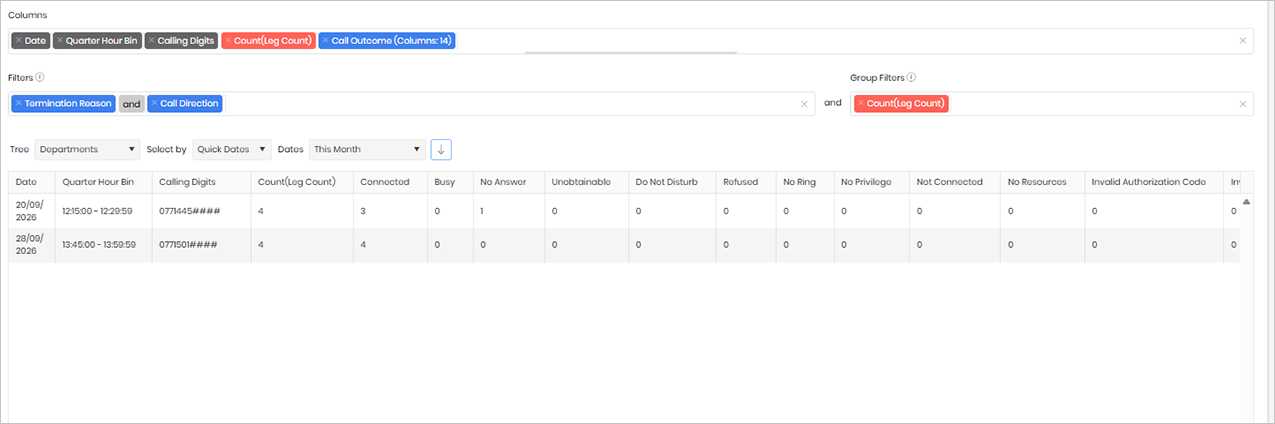
The Repeat Callers widget identifies telephone numbers that have called the business multiple times within a 15-minute period and provides the outcome of each call. Each call is counted as a unique interaction, allowing you to see both the volume of repeat attempts and how those calls were handled.
This widget is particularly useful for identifying situations where callers are repeatedly trying to reach the organisation without success. For example, a high number of calls with outcomes such as No Answer, Busy, or Abandoned may indicate that customers are struggling to get through to the appropriate team or department.
By highlighting repeat call activity and associated call outcomes, the widget helps administrators and managers investigate potential service issues, identify bottlenecks in call handling, and improve the overall caller experience. It can also be used to spot spikes in demand, understaffed teams, or routing issues that may be preventing calls from being answered promptly.
Output list
- Date
- Quarter Hour Bin
- Calling Digits
- Count(Leg Count)
- Connected
- Busy
- No Answer
- Unobtainable
- Do Not Disturb
- Refused
- No Ring
- No Privilege
- Not Connected
- No Resources
- Invalid Authorization Code
- Invalid Client Code
- Invalid Pin
- Queued
Sample output
Widget text
{"ViewGuid":"86c3d71b-0b81-45ad-8eef-2ce931e9e32e","Definition":{"ColumnAggregates":[{"ColumnId":"Date","IsNew":true,"Type":-2,"Alias":"Date_2557f2814f48c96f","Label":"Date"},{"ColumnId":"QuarterHourBin","IsNew":true,"Type":-2,"Alias":"QuarterHourBin_88d1dbddc85cad48","Label":"Quarter Hour Bin"},{"ColumnId":"CallingDigits","IsNew":true,"Type":-2,"Alias":"CallingDigits_9cf4a835bc9a431d","Label":"Calling Digits"},{"ColumnId":"LegCount","IsNew":true,"Type":-1,"AggregateType":"Count","Alias":"LegCount_09db89251fb96cf0","Label":"Count(Leg Count)"},{"ColumnId":"CallOutcomeName","IsNew":true,"Type":-3,"IsExpanded":true,"Alias":"CallOutcomeName_eb6eda133f7dfa2a","Label":"Call Outcome (Columns: 14)"}],"PreFilters":[{"ColumnId":"TerminationReasonName","FilterColumnAlias":"leg_TerminationReasonId","IsNew":true,"Values":["1"],"Names":["Normal"],"Type":3,"Alias":"TerminationReasonId_80c30ffb53d443dd","Label":"Termination Reason","IncludeAll":false},{"Symbol":"&"},{"ColumnId":"CallDirectionName","FilterColumnAlias":"leg_DirectionId","IsNew":true,"Values":["1"],"Names":["Incoming"],"Type":3,"Alias":"DirectionId_96e4f3764019d389","Label":"Call Direction","IncludeAll":false}],"PreGroupFilters":[{"ColumnId":"LegCount","FilterColumnAlias":null,"IsNew":true,"AggregateType":"Count","Operator":"IsGreaterThan","Value":3,"Type":2,"Alias":"LegCount_37ff371ac798f1df","Label":"Count(Leg Count)"}],"Parameters":{"SelectedTreeId":"1","DateSelectionMethod":"UseQuickDates","QuickDate":{"Type":"5","FromLocal":"01/09/2026 00:00:00","ToLocal":"30/09/2026 23:59:59"}},"GridSettings":"{\"columns\":[{\"index\":0,\"field\":\"Date_2557f2814f48c96f\",\"width\":65.0078,\"hidden\":false},{\"index\":1,\"field\":\"QuarterHourBin_88d1dbddc85cad48\",\"width\":137,\"hidden\":false},{\"index\":2,\"field\":\"CallingDigits_9cf4a835bc9a431d\",\"width\":140.00799999999998,\"hidden\":false},{\"index\":3,\"field\":\"LegCount_09db89251fb96cf0\",\"width\":145.00799999999998,\"hidden\":false},{\"index\":4,\"field\":\"CallOutcomeName_eb6eda133f7dfa2a_1\",\"width\":105.0078,\"hidden\":false},{\"index\":5,\"field\":\"CallOutcomeName_eb6eda133f7dfa2a_2\",\"width\":65.0078,\"hidden\":false},{\"index\":6,\"field\":\"CallOutcomeName_eb6eda133f7dfa2a_3\",\"width\":101.0039,\"hidden\":false},{\"index\":7,\"field\":\"CallOutcomeName_eb6eda133f7dfa2a_4\",\"width\":118.9922,\"hidden\":false},{\"index\":8,\"field\":\"CallOutcomeName_eb6eda133f7dfa2a_5\",\"width\":123.992,\"hidden\":false},{\"index\":9,\"field\":\"CallOutcomeName_eb6eda133f7dfa2a_6\",\"width\":85.0078,\"hidden\":false},{\"index\":10,\"field\":\"CallOutcomeName_eb6eda133f7dfa2a_7\",\"width\":82,\"hidden\":false},{\"index\":11,\"field\":\"CallOutcomeName_eb6eda133f7dfa2a_8\",\"width\":107,\"hidden\":false},{\"index\":12,\"field\":\"CallOutcomeName_eb6eda133f7dfa2a_9\",\"width\":128.99200000000002,\"hidden\":false},{\"index\":13,\"field\":\"CallOutcomeName_eb6eda133f7dfa2a_10\",\"width\":118.9922,\"hidden\":false},{\"index\":14,\"field\":\"CallOutcomeName_eb6eda133f7dfa2a_11\",\"width\":197,\"hidden\":false},{\"index\":15,\"field\":\"CallOutcomeName_eb6eda133f7dfa2a_12\",\"width\":151.004,\"hidden\":false},{\"index\":16,\"field\":\"CallOutcomeName_eb6eda133f7dfa2a_13\",\"width\":97,\"hidden\":false},{\"index\":17,\"field\":\"CallOutcomeName_eb6eda133f7dfa2a_14\",\"width\":85.0078,\"hidden\":false}],\"sortField\":null,\"sortDir\":null,\"pageSize\":50}"},"DefinitionVersion":1}
Modifications
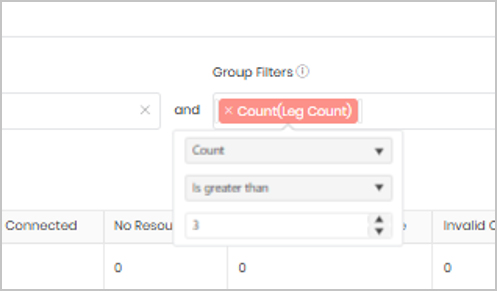
You can adjust the repeat-call threshold by editing the Group Filter. By default, the widget identifies callers who have attempted to contact the business more than three times within a 15-minute period.
If you want to monitor callers who make a higher number of attempts, open the Group Filter and change the value from 3 to your preferred threshold. For example, changing the value to 5 will return only those callers who have made more than five call attempts within the specified time window.
This allows you to tailor the widget to your organisation’s requirements and focus on the level of repeat call activity that is most relevant to your analysis.