Microsoft Teams widgets – Busiest DDI numbers into the business total calls and duration
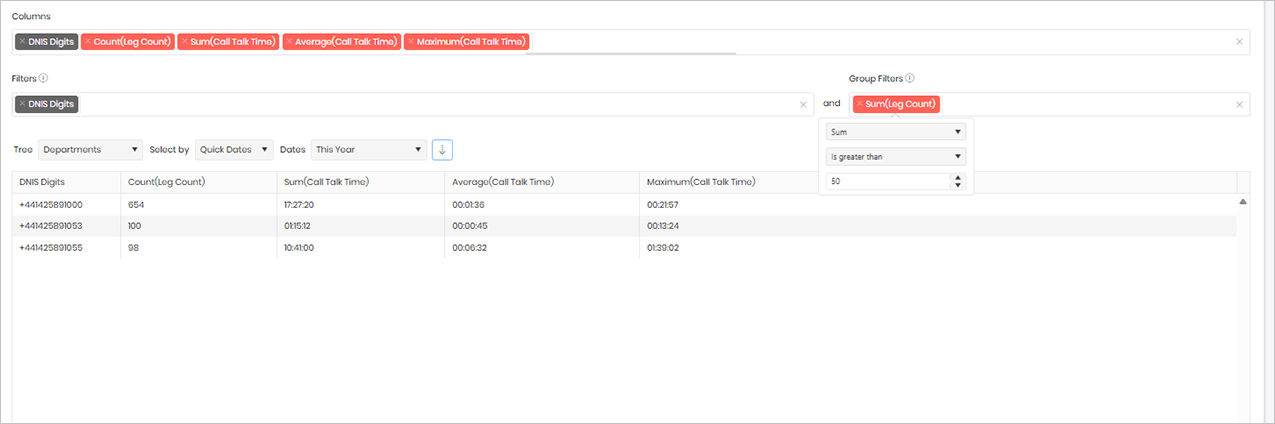
This widget provides a summary of calls made to a specific destination number (DNIS), including the total number of calls, total talk time, average talk time, and the longest individual call for the selected reporting period. This can help identify frequently called numbers, understand usage patterns, and highlight destinations that generate high call volumes or lengthy conversations.
By default, the widget is configured to return only destination numbers that have received more than 50 calls during the selected period. If required, you can adjust this threshold by editing the filter and changing the call count value to meet your reporting requirements.
Output list
- DNIS Digits
- Count(Leg Count)
- Sum(Call Talk Time)
- Average (Call Talk Time)
- Maximum (Call Talk Time)
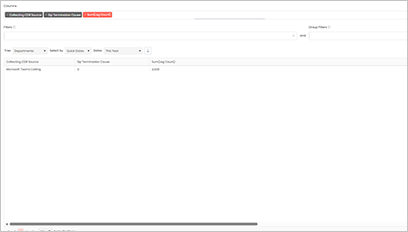
Sample output
Widget definition
{"ViewGuid":"b28738d2-5e45-4529-aa93-90ff8e6d2ea5","Definition":{"ColumnAggregates":[{"ColumnId":"DnisDigits","IsNew":true,"Type":-2,"Alias":"DnisDigits_8a15f07821b0704b","Label":"DNIS Digits"},{"ColumnId":"LegCount","IsNew":true,"Type":-1,"AggregateType":"Count","Alias":"LegCount_e01633bc88641672","Label":"Count(Leg Count)"},{"ColumnId":"CallTalkTime","IsNew":true,"Type":-1,"AggregateType":"Sum","Alias":"CallTalkTime_9db6f8bf737ac5b1","Label":"Sum(Call Talk Time)"},{"ColumnId":"CallTalkTime","IsNew":true,"Type":-1,"AggregateType":"Average","Alias":"CallTalkTime_e80d979710d56d38","Label":"Average(Call Talk Time)"},{"ColumnId":"CallTalkTime","IsNew":true,"Type":-1,"AggregateType":"Maximum","Alias":"CallTalkTime_68b523d46be86dca","Label":"Maximum(Call Talk Time)"}],"PreFilters":[{"ColumnId":"DnisDigits","FilterColumnAlias":null,"IsNew":true,"Operator":"IsNotBlank","Value":"","Type":0,"Alias":"DnisDigits_bab8248edcb00ec1","Label":"DNIS Digits"}],"PreGroupFilters":[{"ColumnId":"LegCount","FilterColumnAlias":null,"IsNew":true,"AggregateType":"Sum","Operator":"IsGreaterThan","Value":50,"Type":2,"Alias":"LegCount_9daa332d89057907","Label":"Sum(Leg Count)"}],"Parameters":{"SelectedTreeId":"1","DateSelectionMethod":"UseQuickDates","QuickDate":{"Type":"6","FromLocal":"01/01/2026 00:00:00","ToLocal":"31/12/2026 23:59:59"}},"GridSettings":"{\"columns\":[{\"index\":0,\"field\":\"DnisDigits_8a15f07821b0704b\",\"width\":153.426,\"hidden\":false},{\"index\":1,\"field\":\"LegCount_e01633bc88641672\",\"width\":222.449,\"hidden\":false},{\"index\":2,\"field\":\"CallTalkTime_9db6f8bf737ac5b1\",\"width\":239.324,\"hidden\":false},{\"index\":3,\"field\":\"CallTalkTime_e80d979710d56d38\",\"width\":277.684,\"hidden\":false},{\"index\":4,\"field\":\"CallTalkTime_68b523d46be86dca\",\"width\":1810.42,\"hidden\":false}],\"sortField\":null,\"sortDir\":null,\"pageSize\":50}"},"DefinitionVersion":1}
Modifications
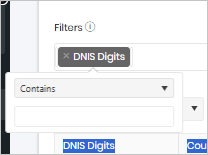
You can filter the widget for a specific DNIS (Dialled Number) by editing the DNIS Digits filter. By default, the filter is configured as DNIS Digits is not blank, which returns all destination numbers. To focus on a particular number, replace this condition with the DNIS number you wish to analyse. This will return call statistics, talk times, and call volumes for that specific destination number only.