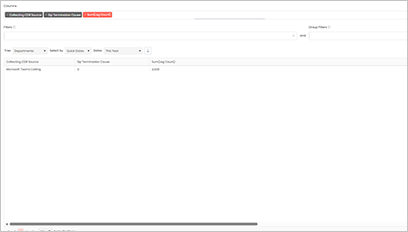
Microsoft Teams widgets – Single-Person Meetings over 20 Minutes
Definition
Microsoft Teams is designed to be flexible, accommodating various scenarios including instances where scheduled group calls have only one participant. The system allows these calls to proceed for the intended duration, ensuring that the user is not disconnected due to lack of participation.
This widget is particularly useful for identifying calls where a user is marked as “In a Meeting” despite no other participants joining and waiting in this meeting with no other users for over 20 minutes, which can assist in better understanding team engagement and availability.
Output list
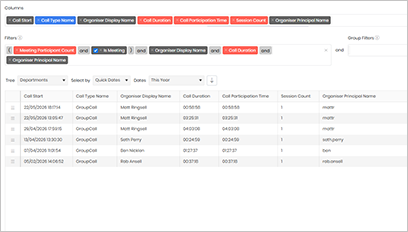
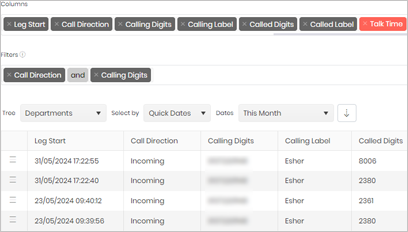
- Call Start
- Call Type Name
- Organiser Display Name
- Call Duration
- Call Participation Time
- Session Count
- Organiser Principal Name
Sample output
Widget text
{"ViewGuid":"ee1306f8-730e-434c-8fce-70e085f6a407","Definition":{"ColumnAggregates":[{"Alias":"CallStart_feb76b0b51b1370b","Label":"Call Start","ColumnId":"CallStart","AggregateType":"Value","IsAggregate":false,"IsExpanded":false,"Type":-2},{"Alias":"CallTypeName_91fe1b4d808ccc7c","Label":"Call Type Name","ColumnId":"CallTypeName","AggregateType":"Value","IsAggregate":false,"IsExpanded":false,"Type":-3},{"Alias":"OrganizerMicrosoftUserDisplayName_7272b45bd8bff1c7","Label":"Organiser Display Name","ColumnId":"OrganizerMicrosoftUserDisplayName","AggregateType":"Value","IsAggregate":false,"IsExpanded":false,"Type":-2},{"Alias":"DurationMilliseconds_69db454bde281195","Label":"Call Duration","ColumnId":"DurationMilliseconds","AggregateType":"Value","IsAggregate":false,"IsExpanded":false,"Type":-1},{"Alias":"ParticipationMilliseconds_4297c1f8a116b755","Label":"Call Participation Time","ColumnId":"ParticipationMilliseconds","AggregateType":"Value","IsAggregate":false,"IsExpanded":false,"Type":-1},{"Alias":"SessionCount_c791f5478e433c3f","Label":"Session Count","ColumnId":"SessionCount","AggregateType":"Value","IsAggregate":false,"IsExpanded":false,"Type":-1},{"Alias":"OrganizerMicrosoftUserPrincipalName_b2bcd8b3e033f010","Label":"Organiser Principal Name","ColumnId":"OrganizerMicrosoftUserPrincipalName","AggregateType":"Value","IsAggregate":false,"IsExpanded":false,"Type":-2}],"PreFilters":[{"Symbol":"("},{"IsAggregate":false,"ColumnId":"factCallSummary_MeetingParticipantCount","FilterColumnAlias":null,"Alias":"factCallSummary_MeetingParticipantCount_b803433e6f668998","Label":"Meeting Participant Count","AggregateType":"Value","Operator":"Equals","Value":1,"Value2":null,"Type":2},{"Symbol":"&"},{"IsAggregate":false,"ColumnId":"factCallSummary_IsMeeting","FilterColumnAlias":null,"Alias":"factCallSummary_IsMeeting_b2b5c7d4a4e86dbd","Label":"Is Meeting","Type":6,"Value":true,"AggregateType":"Value"},{"Symbol":")"},{"Symbol":"&"},{"IsAggregate":false,"ColumnId":"OrganizerMicrosoftUserDisplayName","FilterColumnAlias":null,"Alias":"OrganizerMicrosoftUserDisplayName_e3670cf9ea099643","Label":"Organiser Display Name","Operator":"Contains","Value":null,"Type":0,"AggregateType":"Value"},{"Symbol":"&"},{"IsAggregate":false,"ColumnId":"DurationMilliseconds","FilterColumnAlias":"callDuration","Alias":"DurationMilliseconds_1e461076c8f54b22","Label":"Call Duration","Operator":"IsGreaterThan","Value":1200000,"Value2":0,"AggregateType":"Value","Type":13},{"Symbol":"&"},{"IsAggregate":false,"ColumnId":"OrganizerMicrosoftUserPrincipalName","FilterColumnAlias":null,"Alias":"OrganizerMicrosoftUserPrincipalName_5f5c83792c0e9831","Label":"Organiser Principal Name","Operator":"IsNotBlank","Value":null,"Type":0,"AggregateType":"Value"}],"PreGroupFilters":[],"Parameters":{"SelectedTreeId":"1","DateSelectionMethod":"UseQuickDates","QuickDate":{"Type":"6","FromLocal":"01/01/2026 00:00:00","ToLocal":"31/12/2026 23:59:59"}},"GridSettings":"{\"columns\":[{\"index\":0,\"field\":\"Id\",\"width\":45,\"hidden\":false},{\"index\":1,\"field\":\"CallStart_feb76b0b51b1370b\",\"width\":153,\"hidden\":false},{\"index\":2,\"field\":\"CallTypeName_91fe1b4d808ccc7c\",\"width\":132,\"hidden\":false},{\"index\":3,\"field\":\"OrganizerMicrosoftUserDisplayName_7272b45bd8bff1c7\",\"width\":184.992,\"hidden\":false},{\"index\":4,\"field\":\"DurationMilliseconds_69db454bde281195\",\"width\":115.9922,\"hidden\":false},{\"index\":5,\"field\":\"ParticipationMilliseconds_4297c1f8a116b755\",\"width\":174,\"hidden\":false},{\"index\":6,\"field\":\"SessionCount_c791f5478e433c3f\",\"width\":123,\"hidden\":false},{\"index\":7,\"field\":\"OrganizerMicrosoftUserPrincipalName_b2bcd8b3e033f010\",\"width\":1287.52,\"hidden\":false}],\"sortField\":null,\"sortDir\":null,\"pageSize\":50}"},"DefinitionVersion":1}
Modifications
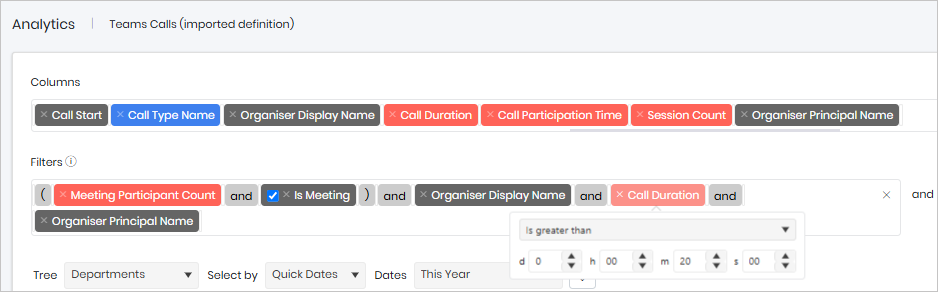
By default, the widget is configured to identify meetings where the Call Duration exceeds 20 minutes. This threshold represents the amount of time a participant has been connected to the meeting before other participants join.
If you need to monitor a different duration, open the Call Duration filter and change the value to is greater than your preferred number of minutes. For example, setting the filter to 30 minutes will return only those meetings where a participant waited longer than 30 minutes before others joined.
Adjusting this threshold allows you to focus on meetings with longer waiting times and identify potential scheduling or attendance issues.