Microsoft Teams widgets – SIP Termination Cause Total
Definition
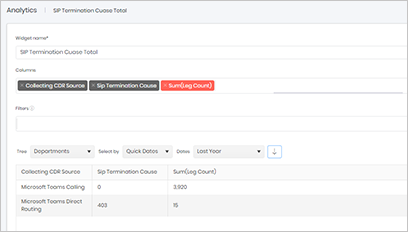
The SIP Termination Causes widget provides a summary of the SIP termination codes generated by calls during the selected reporting period. SIP termination codes indicate why a call ended and are an essential tool for troubleshooting VoIP and Microsoft Teams telephony environments.
These codes can help identify a wide range of call issues, including user hang-ups, network connectivity problems, routing failures, resource limitations, invalid numbers, codec mismatches, and call rejections. For example, SIP code 487 indicates that a request was terminated before completion, while Microsoft-specific termination codes can provide additional insight into the precise reason a call ended.
The widget displays all SIP and termination codes recorded during the selected period, along with the number of occurrences for each code. This enables administrators to quickly identify recurring issues, unusual patterns, or spikes in specific call failures.
Once a termination code of interest has been identified, it can be used as the starting point for further investigation. Administrators can then search for individual calls associated with that code and review the detailed call records to determine the root cause of the issue.
This widget is particularly useful for proactive monitoring, fault diagnosis, and identifying trends that may affect call quality, reliability, or user experience across the telephony platform.
Output list
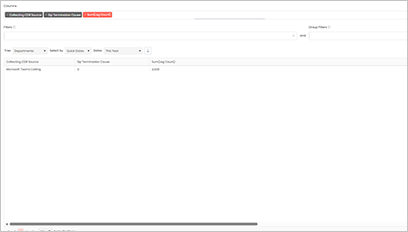
- Collecting CDR Source
- Sip Termination Cause
- Sum(Leg Count)
Sample output
Widget text
{"ViewGuid":"b28738d2-5e45-4529-aa93-90ff8e6d2ea5","Definition":{"ColumnAggregates":[{"Alias":"CollectingCdrSourceName_728580938df5de3f","Label":"Collecting CDR Source","ColumnId":"CollectingCdrSourceName","AggregateType":"Value","IsAggregate":false,"IsExpanded":false,"Type":-2},{"Alias":"leg_SipTerminationCause_55d3c79a5956118e","Label":"Sip Termination Cause","ColumnId":"leg_SipTerminationCause","AggregateType":"Value","IsAggregate":false,"IsExpanded":false,"Type":-2},{"Alias":"LegCount_5df2326949cbe34b","Label":"Sum(Leg Count)","ColumnId":"LegCount","AggregateType":"Sum","IsAggregate":true,"IsExpanded":false,"Type":-1}],"PreFilters":[],"PreGroupFilters":[],"Parameters":{"SelectedTreeId":"1","DateSelectionMethod":"UseQuickDates","QuickDate":{"Type":"6","FromLocal":"01/01/2026 00:00:00","ToLocal":"31/12/2026 23:59:59"}},"GridSettings":"{\"columns\":[{\"index\":0,\"field\":\"CollectingCdrSourceName_728580938df5de3f\",\"width\":300.417,\"hidden\":false},{\"index\":1,\"field\":\"leg_SipTerminationCause_55d3c79a5956118e\",\"width\":317.79133,\"hidden\":false},{\"index\":2,\"field\":\"LegCount_5df2326949cbe34b\",\"width\":2717.75333,\"hidden\":false}],\"sortField\":null,\"sortDir\":null,\"pageSize\":50}"},"DefinitionVersion":1}
Modifications
No modifications are required for this widget by default. However, you can enhance the analysis by adding additional columns such as Date or Hour Bin to identify patterns in SIP termination causes over time. This can help determine whether specific termination codes occur more frequently on certain days or during particular periods of the day.
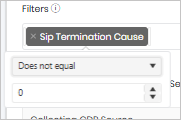
You may also wish to add a filter for SIP Termination Cause and configure it to return records where the value is not equal to 0. As a SIP termination cause of 0 typically indicates that the call ended successfully with no error, excluding these records allows you to focus on calls that may have encountered failures, routing issues, connectivity problems, or other abnormal termination conditions.
Analysing SIP termination causes in this way can help identify recurring issues, troubleshoot call failures more efficiently, and highlight trends that may require further investigation.