Build the analysis around your question
Tiger Prism Analytics gives you control over how call data is selected, organised and calculated.
Dimensions describe the data you want to analyse, such as call direction, outcome, group, device, location or media type.
Measures quantify it through values including leg count, talk time, ring time, response time, queue time, cost and bill.
Combine them with precise filters, grouping and aggregation to turn large volumes of call records into a focused, useful result.
Analyse call activity across your organisation
Start with the question you need to answer, then build the query around it.
Choose Dimensions to categorise the data by attributes such as direction, outcome, group, device, location, digits or media type.
Add Measures to count call legs or calculate talk time, ring time, response time, queue time, cost and bill values.
Filter the results to remove irrelevant records, group them to reveal patterns and apply calculations such as count, sum, average, minimum and maximum. You can analyse high-level trends or return individual records when a specific call needs closer investigation.
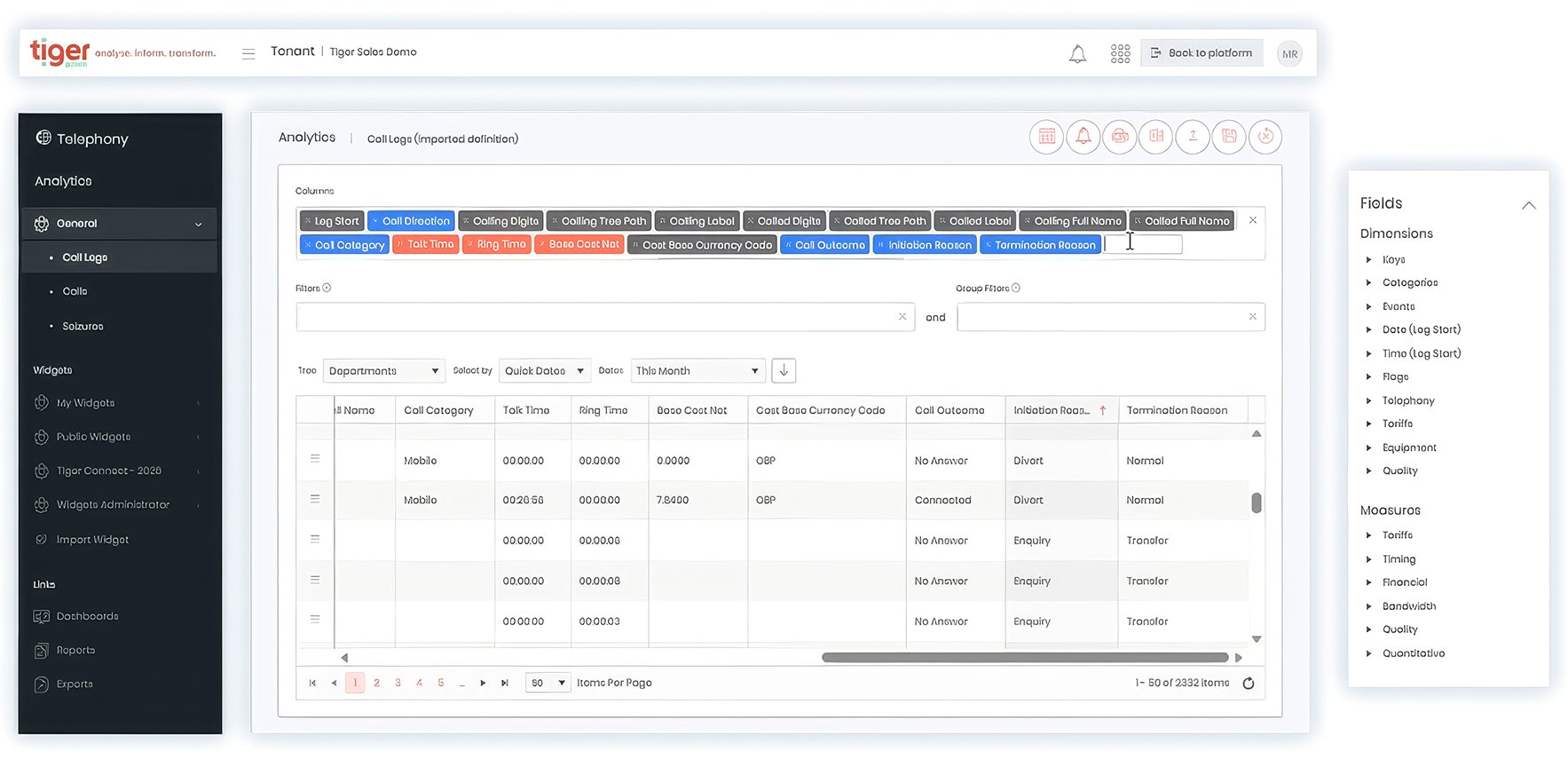
Explore communications data
Access dashboards, analytics, reports and saved widgets, then import, export and share insights across your organisation.
Analyse what matters most
Select the metrics and dimensions that matter to your organisation, from activity and quality to performance and cost.
Focus on the right data
Filter results by date range, department, user, service or location to answer specific business questions.
Build tailored reports
Create custom views using hundreds of available fields and measures without specialist reporting expertise.
Turn insight into action
Identify trends, uncover anomalies and generate reports that support better business decisions.
Get clearer answers from your call data
Use the attributes already captured in your CDR data to investigate the questions that matter to your teams.

Which groups receive the most unanswered calls?

Where are response or queue times longest?

How does call handling differ by group or location?

Which devices and media types are being used?
Where are calls being transferred?

How often do calls reach voicemail or leave a message?

Which call patterns are driving cost?

What termination reasons appear most frequently?
Start with the pattern. Get to the record.
Use aggregated analysis to understand what is happening across a period, group, location or call type. Dimensions determine how the results are grouped, while Measures show how many, how long or how much.
When a summary reveals an exception, refine the query to return the relevant discrete records. Call Legs provides one row for each leg and the widest range of available fields, making it useful for examining transfers, diverts and more complex call paths. Calls provides a whole-call view with a smaller field set.
For discrete results, Record Detail can show the linked legs behind the selected call, helping you move from an overall pattern to the activity that contributed to it.


…Tiger plays a key role in helping us to ensure our tech infrastructure is not only successfully adopted but utilised to its full potential. It allows us to see the impact our tech investments have had, removing any guesswork or assumptions.”
Build the answer in three steps
Select the data, calculate what matters and keep the result for further investigation or reporting.

Define the view
Choose the records and attributes relevant to your question.

Group and calculate
Turn detailed records into meaningful comparisons.

Inspect and reuse
Take the result beyond the initial query.
Answer the questions behind call performance
Get the answers behind your call data
Get more from every call record
Use flexible dimensions, measures, filters and aggregates to understand call activity, investigate performance and turn recorded CDR data into answers your teams can use.