Microsoft Teams widgets – Emotive Feedback Overview
Definition
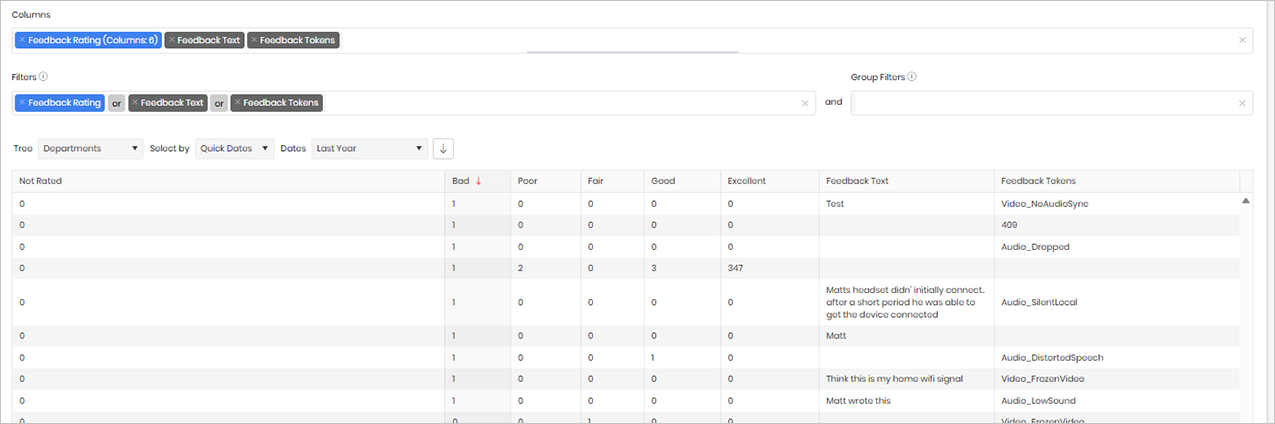
The Emotive Feedback widget provides a summary of user-submitted feedback collected at the end of a call or meeting. When prompted, users can rate their experience and select feedback categories such as Good, Poor, or Excellent, along with any additional comments they choose to provide.
The widget aggregates this feedback to show overall sentiment trends, including the number of positive, negative, and neutral responses, helping organisations understand the end-user experience. Unlike technical quality reports, this widget is based entirely on the user’s perception of the call experience and does not include any technical analysis of call quality, network performance, or device issues.
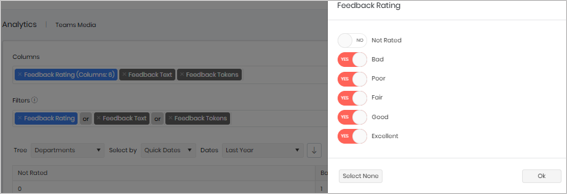
- Not Rated
- Bad
- Poor
- Fair
- Good
- Excellent
- Feedback Text
- Feedback Tokens
Sample output
Widget text
{"ViewGuid":"65de8464-ff48-4a1e-909d-7a8469950cf3","Definition":{"ColumnAggregates":[{"ColumnId":"feedback_FeedbackRatingLabel","IsNew":true,"Type":-3,"IsExpanded":true,"Alias":"feedback_FeedbackRatingLabel_bed3fb902a73fcf2","Label":"Feedback Rating (Columns: 6)"},{"ColumnId":"feedback_FeedbackText","IsNew":true,"Type":-2,"Alias":"feedback_FeedbackText_f9b2873da1f4a206","Label":"Feedback Text"},{"ColumnId":"feedback_Tokens","IsNew":true,"Type":-2,"Alias":"feedback_Tokens_549b394651ade7ac","Label":"Feedback Tokens"}],"PreFilters":[{"ColumnId":"feedback_FeedbackRatingLabel","FilterColumnAlias":"feedback_FeedbackRatingId","IsNew":true,"Values":["1","2","3","4","5"],"Names":["Bad","Poor","Fair","Good","Excellent"],"Type":3,"Alias":"feedbackRatingId_94e4232defb0c601","Label":"Feedback Rating","IncludeAll":false},{"Symbol":"|"},{"ColumnId":"feedback_FeedbackText","FilterColumnAlias":null,"IsNew":true,"Operator":"IsNotBlank","Value":"","Type":0,"Alias":"feedback_FeedbackText_2d98642e1e424697","Label":"Feedback Text"},{"Symbol":"|"},{"ColumnId":"feedback_Tokens","FilterColumnAlias":null,"IsNew":true,"Operator":"IsNotBlank","Value":"","Type":0,"Alias":"feedback_Tokens_c91a15e292dc85c0","Label":"Feedback Tokens"}],"PreGroupFilters":[],"Parameters":{"SelectedTreeId":"1","DateSelectionMethod":"UseQuickDates","QuickDate":{"Type":"9","FromLocal":"01/01/2025 00:00:00","ToLocal":"31/12/2025 23:59:59"}},"GridSettings":"{\"columns\":[{\"index\":0,\"field\":\"feedback_FeedbackRatingLabel_bed3fb902a73fcf2_0\",\"width\":614.07,\"hidden\":false},{\"index\":1,\"field\":\"feedback_FeedbackRatingLabel_bed3fb902a73fcf2_1\",\"width\":93.25,\"hidden\":false},{\"index\":2,\"field\":\"feedback_FeedbackRatingLabel_bed3fb902a73fcf2_2\",\"width\":99.4414,\"hidden\":false},{\"index\":3,\"field\":\"feedback_FeedbackRatingLabel_bed3fb902a73fcf2_3\",\"width\":90.125,\"hidden\":false},{\"index\":4,\"field\":\"feedback_FeedbackRatingLabel_bed3fb902a73fcf2_4\",\"width\":108.8164,\"hidden\":false},{\"index\":5,\"field\":\"feedback_FeedbackRatingLabel_bed3fb902a73fcf2_5\",\"width\":139.89100000000002,\"hidden\":false},{\"index\":6,\"field\":\"feedback_FeedbackText_f9b2873da1f4a206\",\"width\":248.738,\"hidden\":false},{\"index\":7,\"field\":\"feedback_Tokens_549b394651ade7ac\",\"width\":1400.85,\"hidden\":false}],\"sortField\":\"feedback_FeedbackRatingLabel_bed3fb902a73fcf2_1\",\"sortDir\":\"desc\",\"pageSize\":50}"},"DefinitionVersion":1}
Modifications
You can customise the results by editing the Feedback Rating filter. This allows you to display only specific ratings, such as Poor, Fair, Good, or Excellent, or any combination of these values.
You can also filter on specific Feedback Tokens or Feedback Text if you are investigating particular comments or types of feedback. If no filters are applied, the widget will return all available feedback regardless of rating or response type.