Telephony widgets – Time of Day Breakdown
Definition
The Time of Day Breakdown widget provides a summary of call leg volumes across a series of configurable time intervals throughout the day. The data can be grouped into hourly, half-hourly, quarter-hourly, or minute-by-minute time bins, allowing you to analyse call activity at the level of detail most appropriate for your reporting needs.
This widget is particularly useful for identifying peak calling periods, understanding traffic patterns throughout the day, and supporting workforce planning by highlighting when call volumes are highest.
Output list
- Hour Bin
- Call Direction
- Count(Call Leg Count) -Total legs
- Connected
- Busy
- No Answer
- Unobtainable
- Do Not Disturb
- Refused
- No Ring
- No Privilege
- Not Connected
- No Resources
- Invalid Authorization Code
- Invalid Client Code
- Invalid Pin
- Queued
Sample output
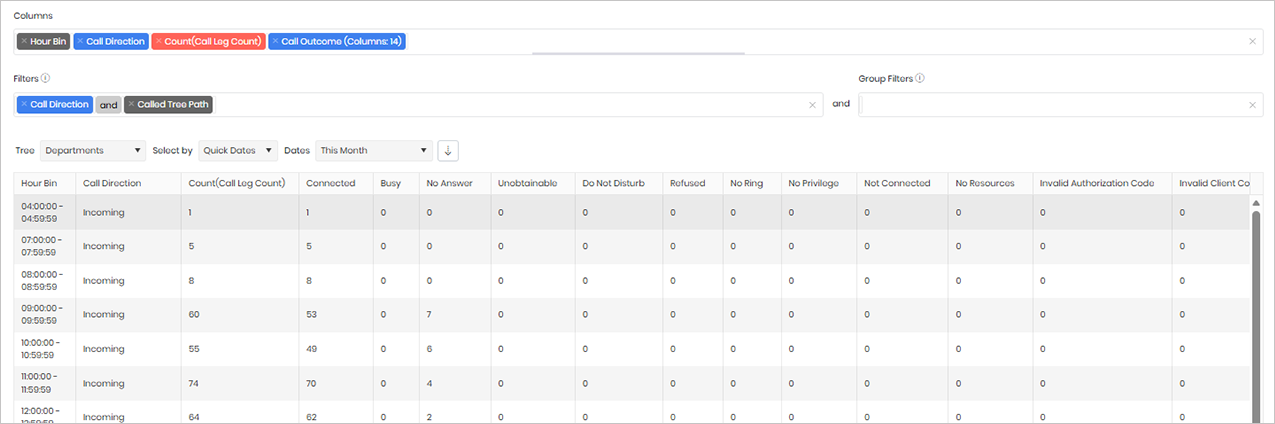
Widget text
{"ViewGuid":"86c3d71b-0b81-45ad-8eef-2ce931e9e32e","Definition":{"ColumnAggregates":[{"ColumnId":"HourBin","IsNew":true,"Type":-2,"Alias":"HourBin_c50ba4b0bb4d023d","Label":"Hour Bin"},{"ColumnId":"CallDirectionName","IsNew":true,"Type":-3,"IsExpanded":false,"Alias":"CallDirectionName_66e1e39a592c3ff8","Label":"Call Direction"},{"ColumnId":"CallLegCount","IsNew":true,"Type":-1,"AggregateType":"Count","Alias":"CallLegCount_f04c00d607c42ebd","Label":"Count(Call Leg Count)"},{"ColumnId":"CallOutcomeName","IsNew":true,"Type":-3,"IsExpanded":true,"Alias":"CallOutcomeName_bd0edad33abf1247","Label":"Call Outcome (Columns: 14)"}],"PreFilters":[{"ColumnId":"CallDirectionName","FilterColumnAlias":"leg_DirectionId","IsNew":true,"Values":["1"],"Names":["Incoming"],"Type":3,"Alias":"DirectionId_9c135121dbb6f0bd","Label":"Call Direction","IncludeAll":false},{"Symbol":"&"},{"ColumnId":"CalledTreePath","FilterColumnAlias":null,"IsNew":true,"Operator":"Contains","Value":"","Type":0,"Alias":"CalledTreePath_1fc3afe459926087","Label":"Called Tree Path"}],"PreGroupFilters":[],"Parameters":{"SelectedTreeId":"1","DateSelectionMethod":"UseQuickDates","QuickDate":{"Type":"5","FromLocal":"01/09/2026 00:00:00","ToLocal":"30/09/2026 23:59:59"}},"GridSettings":"{\"columns\":[{\"index\":0,\"field\":\"HourBin_c50ba4b0bb4d023d\",\"width\":86.0039,\"hidden\":false},{\"index\":1,\"field\":\"CallDirectionName_66e1e39a592c3ff8\",\"width\":148.992,\"hidden\":false},{\"index\":2,\"field\":\"CallLegCount_f04c00d607c42ebd\",\"width\":172,\"hidden\":false},{\"index\":3,\"field\":\"CallOutcomeName_bd0edad33abf1247_1\",\"width\":105.0078,\"hidden\":false},{\"index\":4,\"field\":\"CallOutcomeName_bd0edad33abf1247_2\",\"width\":65.0078,\"hidden\":false},{\"index\":5,\"field\":\"CallOutcomeName_bd0edad33abf1247_3\",\"width\":101.0039,\"hidden\":false},{\"index\":6,\"field\":\"CallOutcomeName_bd0edad33abf1247_4\",\"width\":118.9922,\"hidden\":false},{\"index\":7,\"field\":\"CallOutcomeName_bd0edad33abf1247_5\",\"width\":123.992,\"hidden\":false},{\"index\":8,\"field\":\"CallOutcomeName_bd0edad33abf1247_6\",\"width\":85.0078,\"hidden\":false},{\"index\":9,\"field\":\"CallOutcomeName_bd0edad33abf1247_7\",\"width\":82,\"hidden\":false},{\"index\":10,\"field\":\"CallOutcomeName_bd0edad33abf1247_8\",\"width\":107,\"hidden\":false},{\"index\":11,\"field\":\"CallOutcomeName_bd0edad33abf1247_9\",\"width\":128.99200000000002,\"hidden\":false},{\"index\":12,\"field\":\"CallOutcomeName_bd0edad33abf1247_10\",\"width\":118.9922,\"hidden\":false},{\"index\":13,\"field\":\"CallOutcomeName_bd0edad33abf1247_11\",\"width\":197,\"hidden\":false},{\"index\":14,\"field\":\"CallOutcomeName_bd0edad33abf1247_12\",\"width\":151.004,\"hidden\":false},{\"index\":15,\"field\":\"CallOutcomeName_bd0edad33abf1247_13\",\"width\":97,\"hidden\":false},{\"index\":16,\"field\":\"CallOutcomeName_bd0edad33abf1247_14\",\"width\":85.0078,\"hidden\":false}],\"sortField\":null,\"sortDir\":null,\"pageSize\":50}"},"DefinitionVersion":1}
Modifications
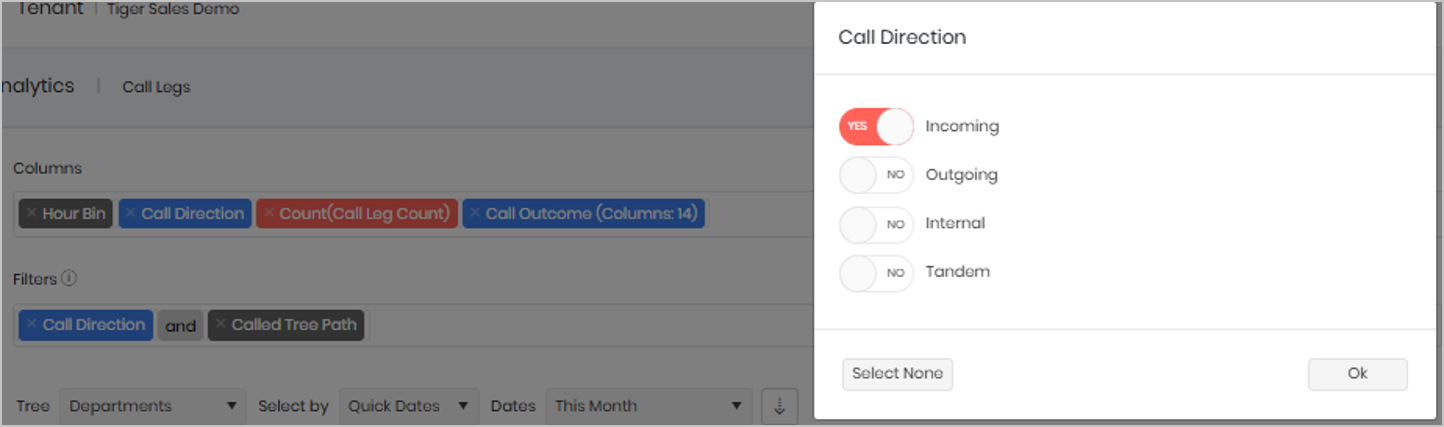
Click on the Call Direction filter and select the call direction(s) you wish to analyse. By default, the widget is configured to display Incoming calls only; however, you can also enable Outgoing and/or Internal calls depending on your reporting requirements.
Multiple call directions can be selected at the same time, allowing you to compare different types of call activity within a single view. The appropriate selection will depend on the type of analysis you are performing and the call traffic you wish to investigate.
Within the Call Tree Path filter, you can enter the department, cost centre, team, or other directory value that you want to analyse for the selected directory tree. To do this, click on Call Tree Path, select Contains, and enter the value you wish to search for.
For example, if you are only interested in calls relating to the Sales department, select Contains and enter Sales. The widget will then return only records associated with departments or tree paths that contain the word “Sales”.