Telephony widgets – Understanding Call Leg Volumes
Definition
The Call Leg Count widget provides a view of calls as complete interactions rather than individual call legs. This is an important distinction when analysing call activity and reporting on business usage.
A Call represents a single end-to-end conversation or customer interaction, regardless of how many times it is transferred within the organisation. A Call Leg represents an individual stage or event within that call journey.
For example, if a call enters the business, is transferred between several users or departments, and is eventually answered, the call may generate five separate call legs. However, it is still considered one call.
This distinction is important when reporting on telephony activity:
Call Analytics answers the question, “How many calls did we receive or make?”
Leg Analytics answers the question, “How many telephony events or call-handling activities occurred within those calls?”
Organisations typically use Call Analytics when measuring customer interactions, call volumes, or service demand, as it reflects the number of unique calls handled by the business. Leg Analytics is more useful when analysing internal call routing, transfers, user activity, Hunt Group performance, or understanding how calls move through the organisation.
By comparing call counts and leg counts, you can gain a clearer understanding of both customer demand and the operational activity required to handle those calls.
Output list
- Month
- Incoming – The initial call direction of the call
- Outgoing – The initial call direction of the call
- Internal – The initial call direction of the call
- Tandem – The initial call direction of the call
- Sum (Call Talk Time) – Total talk time
- Count (Call Leg Count) – Call total
- Is Answered – (If the call is answered at any of the legs the flag is set as a tick)
Sample output
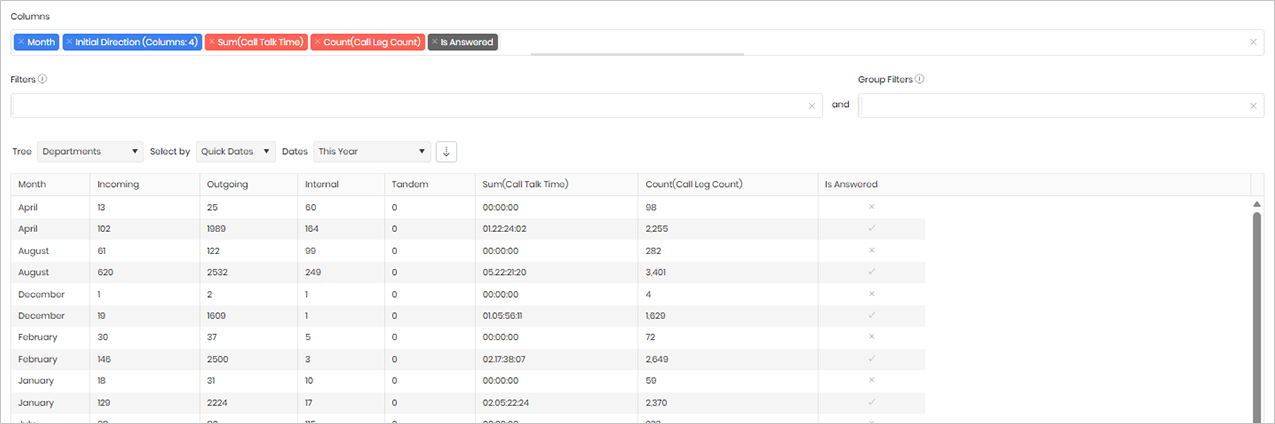
Widget text
{"ViewGuid":"cc89de57-31c8-489f-8ba7-4834fea57414","Definition":{"ColumnAggregates":[{"ColumnId":"MonthName","IsNew":true,"Type":-3,"IsExpanded":false,"Alias":"MonthName_ebba818a173506da","Label":"Month"},{"Alias":"InitialDirectionName_5f01c3561a054680","Label":"Initial Direction (Columns: 4)","ColumnId":"InitialDirectionName","AggregateType":"Value","IsAggregate":false,"IsExpanded":true,"Type":-3},{"Alias":"CallTalkTime_82d86d2f0414c6d7","Label":"Sum(Call Talk Time)","ColumnId":"CallTalkTime","AggregateType":"Sum","IsAggregate":false,"IsExpanded":false,"Type":-1},{"Alias":"LegCount_8d9d0743127b83d2","Label":"Count(Call Leg Count)","ColumnId":"LegCount","AggregateType":"Count","IsAggregate":false,"IsExpanded":false,"Type":-1},{"ColumnId":"IsAnswered","IsNew":true,"Type":-2,"Alias":"IsAnswered_72a725a1ae322c4d","Label":"Is Answered"}],"PreFilters":[],"PreGroupFilters":[],"Parameters":{"SelectedTreeId":"1","DateSelectionMethod":"UseQuickDates","QuickDate":{"Type":"6","FromLocal":"01/01/2026 00:00:00","ToLocal":"31/12/2026 23:59:59"}},"GridSettings":"{\"columns\":[{\"index\":0,\"field\":\"MonthName_ebba818a173506da\",\"width\":110.2031,\"hidden\":false},{\"index\":1,\"field\":\"InitialDirectionName_5f01c3561a054680_1\",\"width\":154.285,\"hidden\":false},{\"index\":2,\"field\":\"InitialDirectionName_5f01c3561a054680_2\",\"width\":138.113,\"hidden\":false},{\"index\":3,\"field\":\"InitialDirectionName_5f01c3561a054680_3\",\"width\":121.941,\"hidden\":false},{\"index\":4,\"field\":\"InitialDirectionName_5f01c3561a054680_4\",\"width\":127.82,\"hidden\":false},{\"index\":5,\"field\":\"CallTalkTime_82d86d2f0414c6d7\",\"width\":229.227,\"hidden\":false},{\"index\":6,\"field\":\"LegCount_8d9d0743127b83d2\",\"width\":252.742,\"hidden\":false},{\"index\":7,\"field\":\"IsAnswered_72a725a1ae322c4d\",\"width\":1454.87,\"hidden\":false}],\"sortField\":null,\"sortDir\":null,\"pageSize\":50}"},"DefinitionVersion":1}
Modifications
No modifications are required for this widget. However, if you would like to analyse call volumes by hour, you can add the Hour Bin column to the widget. This will group the results into hourly intervals, allowing you to identify call patterns and peak activity periods throughout the day.