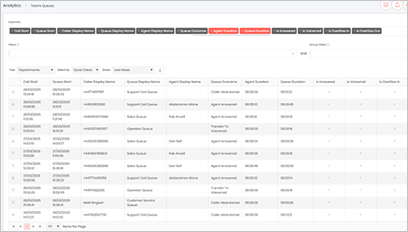
Microsoft Teams widgets – Call Queue Analysis
Definition
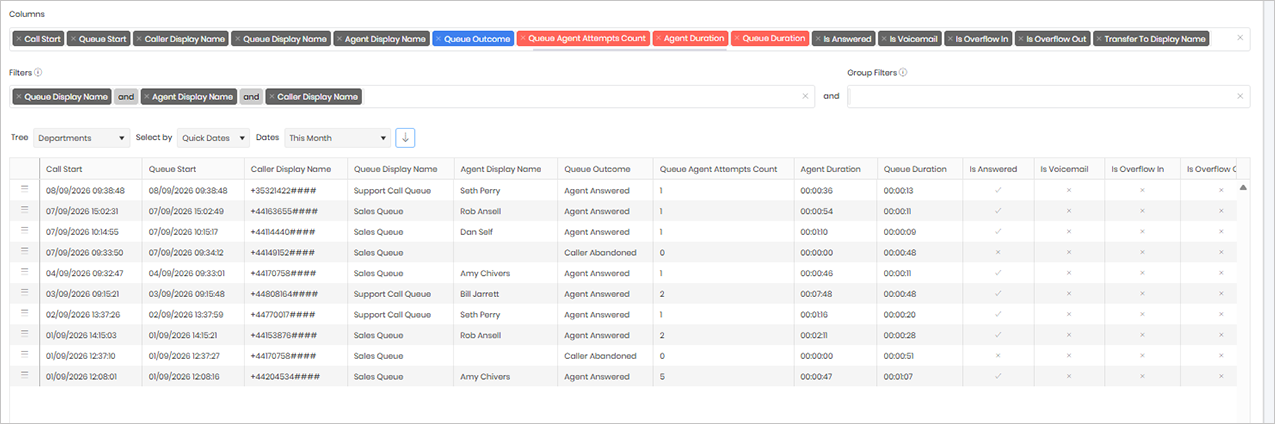
The Queue widget provides detailed visibility into calls that have entered a call queue, allowing administrators to analyse the complete caller journey from the moment a caller enters the queue until the call reaches its final outcome.
The widget displays key information including the caller, the agent who answered the call, the queue outcome, the number of agents the system attempted before the call was answered or abandoned, the agent talk time, and the total time the caller spent waiting in the queue.
In addition, the widget shows what happened to calls that were not answered within the queue. This includes whether the call was redirected to voicemail, overflowed to another queue, or was routed elsewhere based on the queue configuration.
For answered calls, the widget also provides visibility into any subsequent call activity, allowing you to determine whether the answering agent transferred the call to another user or agent within the organisation.
The widget can be filtered to focus on specific areas of interest, including a particular calling number, agent, or queue. This makes it easy to investigate individual customer interactions, review agent performance and workload, or analyse activity within a specific queue.
This detailed view helps organisations evaluate queue performance, identify long wait times, understand agent handling patterns, investigate missed calls, and ensure that callers are being routed and managed effectively throughout their interaction with the business.
Output list
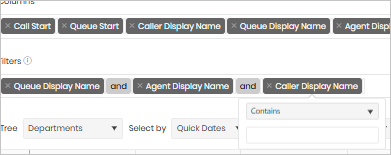
- Call Start
- Queue Start
- Caller Display Name
- Queue Display Name
- Agent Display Name
- Queue Outcome
- Queue Agent Attempts Count
- Agent Duration
- Queue Duration
- Is Answered
- Is Voicemail
- Is Overflow In
- Is Overflow Out
- Transfer To Display Name – (After the outcome of the leg who the agent transferred the call to)
Sample output
Widget text
{"ViewGuid":"4c6f6b87-c57e-4cb8-8032-c70964269cb8","Definition":{"ColumnAggregates":[{"Alias":"map_CallStart_25438002dc4c6731","Label":"Call Start","ColumnId":"map_CallStart","AggregateType":"Value","IsAggregate":false,"IsExpanded":false,"Type":-2},{"Alias":"map_SessionStart_7dba8681853b22d6","Label":"Queue Start","ColumnId":"map_SessionStart","AggregateType":"Value","IsAggregate":false,"IsExpanded":false,"Type":-2},{"Alias":"callerName_DisplayName_db30a15bc9715e6a","Label":"Caller Display Name","ColumnId":"callerName_DisplayName","AggregateType":"Value","IsAggregate":false,"IsExpanded":false,"Type":-2},{"Alias":"callQueueName_DisplayName_17edf062aa72a143","Label":"Queue Display Name","ColumnId":"callQueueName_DisplayName","AggregateType":"Value","IsAggregate":false,"IsExpanded":false,"Type":-2},{"Alias":"callQueueAgentName_DisplayName_fc6d87cf945a03fc","Label":"Agent Display Name","ColumnId":"callQueueAgentName_DisplayName","AggregateType":"Value","IsAggregate":false,"IsExpanded":false,"Type":-2},{"Alias":"queueOutcome_QueueOutcomeName_23e8b06ecfb62a7a","Label":"Queue Outcome","ColumnId":"queueOutcome_QueueOutcomeName","AggregateType":"Value","IsAggregate":false,"IsExpanded":false,"Type":-3},{"ColumnId":"callQueue_CallQueueAgentCount","IsNew":true,"Type":-1,"AggregateType":"Value","Alias":"callQueue_CallQueueAgentCount_ea7d3a2a08c54adc","Label":"Queue Agent Attempts Count"},{"Alias":"callQueue_AgentDurationMilliseconds_df1fa5dba47f1a48","Label":"Agent Duration","ColumnId":"callQueue_AgentDurationMilliseconds","AggregateType":"Value","IsAggregate":false,"IsExpanded":false,"Type":-1},{"Alias":"callQueue_QueueDurationMilliseconds_1b6bfadddd635df9","Label":"Queue Duration","ColumnId":"callQueue_QueueDurationMilliseconds","AggregateType":"Value","IsAggregate":false,"IsExpanded":false,"Type":-1},{"Alias":"callQueue_IsAnswered_590f199bc1713416","Label":"Is Answered","ColumnId":"callQueue_IsAnswered","AggregateType":"Value","IsAggregate":false,"IsExpanded":false,"Type":-2},{"Alias":"callQueue_IsVoicemail_2130167adda9a642","Label":"Is Voicemail","ColumnId":"callQueue_IsVoicemail","AggregateType":"Value","IsAggregate":false,"IsExpanded":false,"Type":-2},{"Alias":"callQueue_IsOverflowIn_e71aa8e58902e7da","Label":"Is Overflow In","ColumnId":"callQueue_IsOverflowIn","AggregateType":"Value","IsAggregate":false,"IsExpanded":false,"Type":-2},{"Alias":"callQueue_IsOverflowOut_1ac7b2a73833856d","Label":"Is Overflow Out","ColumnId":"callQueue_IsOverflowOut","AggregateType":"Value","IsAggregate":false,"IsExpanded":false,"Type":-2},{"ColumnId":"callQueueTransfer_DisplayName","IsNew":true,"Type":-2,"Alias":"callQueueTransfer_DisplayName_956ff9bc6a1492ac","Label":"Transfer To Display Name"}],"PreFilters":[{"ColumnId":"callQueueName_DisplayName","FilterColumnAlias":null,"IsNew":true,"Operator":"Contains","Value":"","Type":0,"Alias":"callQueueName_DisplayName_29870fc89bc5dc47","Label":"Queue Display Name"},{"Symbol":"&"},{"ColumnId":"callQueueAgentName_DisplayName","FilterColumnAlias":null,"IsNew":true,"Operator":"Contains","Value":"","Type":0,"Alias":"callQueueAgentName_DisplayName_f87949f77de18a3b","Label":"Agent Display Name"},{"Symbol":"&"},{"ColumnId":"callerName_DisplayName","FilterColumnAlias":null,"IsNew":true,"Operator":"Contains","Value":"","Type":0,"Alias":"callerName_DisplayName_b891c523887cfd55","Label":"Caller Display Name"}],"PreGroupFilters":[],"Parameters":{"SelectedTreeId":"1","DateSelectionMethod":"UseQuickDates","QuickDate":{"Type":"5","FromLocal":"01/09/2026 00:00:00","ToLocal":"30/09/2026 23:59:59"}},"GridSettings":"{\"columns\":[{\"index\":0,\"field\":\"Id\",\"width\":45,\"hidden\":false},{\"index\":1,\"field\":\"map_CallStart_25438002dc4c6731\",\"width\":158,\"hidden\":false},{\"index\":2,\"field\":\"map_SessionStart_7dba8681853b22d6\",\"width\":158.00033,\"hidden\":false},{\"index\":3,\"field\":\"callerName_DisplayName_db30a15bc9715e6a\",\"width\":160.00033,\"hidden\":false},{\"index\":4,\"field\":\"callQueueName_DisplayName_17edf062aa72a143\",\"width\":165.00033,\"hidden\":false},{\"index\":5,\"field\":\"callQueueAgentName_DisplayName_fc6d87cf945a03fc\",\"width\":161.00033,\"hidden\":false},{\"index\":6,\"field\":\"queueOutcome_QueueOutcomeName_23e8b06ecfb62a7a\",\"width\":148.00033,\"hidden\":false},{\"index\":7,\"field\":\"callQueue_CallQueueAgentCount_ea7d3a2a08c54adc\",\"width\":218.00033,\"hidden\":false},{\"index\":8,\"field\":\"callQueue_AgentDurationMilliseconds_df1fa5dba47f1a48\",\"width\":129.00033,\"hidden\":false},{\"index\":9,\"field\":\"callQueue_QueueDurationMilliseconds_1b6bfadddd635df9\",\"width\":133.00033,\"hidden\":false},{\"index\":10,\"field\":\"callQueue_IsAnswered_590f199bc1713416\",\"width\":110.00003000000001,\"hidden\":false},{\"index\":11,\"field\":\"callQueue_IsVoicemail_2130167adda9a642\",\"width\":110.00003000000001,\"hidden\":false},{\"index\":12,\"field\":\"callQueue_IsOverflowIn_e71aa8e58902e7da\",\"width\":117.00003000000001,\"hidden\":false},{\"index\":13,\"field\":\"callQueue_IsOverflowOut_1ac7b2a73833856d\",\"width\":128.00033,\"hidden\":false},{\"index\":14,\"field\":\"callQueueTransfer_DisplayName_956ff9bc6a1492ac\",\"width\":192.00033,\"hidden\":false}],\"sortField\":null,\"sortDir\":null,\"pageSize\":50}"},"DefinitionVersion":1}
Modifications
You can use any combination of the three filters below to narrow down the results. When combining filters, ensure that the AND and OR operators are configured correctly so that the search returns the data you are expecting. Using AND will require all filter conditions to be met, whereas OR will return results that match any of the selected conditions.
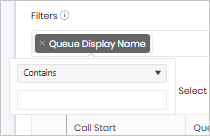
You can filter the widget using the Queue Display Name, which corresponds to the display name configured for the queue within Prism. This allows you to focus the results on a specific queue and analyse only the calls associated with that queue.
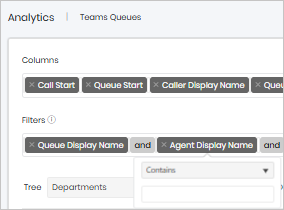
You can filter the widget by Agent Display Name to view all calls that were answered by, routed to, or associated with a specific agent. This makes it easy to review an individual agent’s call activity.
You can filter the widget by Caller Display Name to view calls from a specific caller. This may be an external PSTN number calling into the queue or an internal user within the organisation. Filtering by caller allows you to investigate individual caller journeys, review repeat contact attempts, and analyse how calls from a particular person or number were handled.