Microsoft Teams widgets – Auto Attendant Calls by Hour
Definition
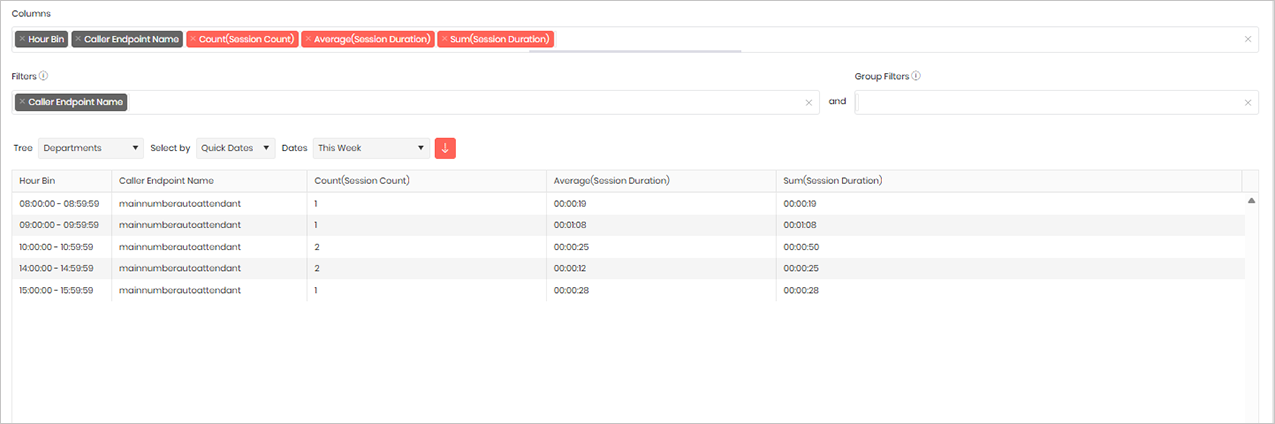
The Auto Attendant Calls by Hour widget provides a summary of calls received by Auto Attendants, grouped into hourly intervals for the selected reporting period. This helps organisations understand call volumes throughout the day, identify peak calling periods, and analyse how Auto Attendants are being utilised.
Please note that Microsoft does not currently provide information about where a caller was routed after leaving an Auto Attendant, so this widget is limited to activity within the Auto Attendant itself.
For customers running Tiger Prism 26.02 or later, a dedicated Auto Attendant Report and Auto Attendant Dashboard are also available, providing enhanced reporting and analytics specifically for Auto Attendant activity.
Output list
- Hour Bin
- Caller Endpoint Name
- Count(Session Count)
- Average(Session Duration)
- Sum(Session Duration)
Sample output
Widget text
{"ViewGuid":"68d758c3-b42e-48b4-a494-93cfe42574e8","Definition":{"ColumnAggregates":[{"ColumnId":"HourBin","IsNew":true,"Type":-2,"Alias":"HourBin_11100265f6256628","Label":"Hour Bin"},{"ColumnId":"callerEndpoint_EndPointName","IsNew":true,"Type":-2,"Alias":"callerEndpoint_EndPointName_f7a6f84c6da5baa0","Label":"Caller Endpoint Name"},{"ColumnId":"SessionCount","IsNew":true,"Type":-1,"AggregateType":"Count","Alias":"SessionCount_22d494d501e5f331","Label":"Count(Session Count)"},{"ColumnId":"SessionDurationMilliseconds","IsNew":true,"Type":-1,"AggregateType":"Average","Alias":"SessionDurationMilliseconds_09093fa8e6fd5098","Label":"Average(Session Duration)"},{"ColumnId":"SessionDurationMilliseconds","IsNew":true,"Type":-1,"AggregateType":"Sum","Alias":"SessionDurationMilliseconds_bbe6309f2d1aaa1d","Label":"Sum(Session Duration)"}],"PreFilters":[{"ColumnId":"callerEndpoint_EndPointName","FilterColumnAlias":null,"IsNew":true,"Operator":"Contains","Value":"","Type":0,"Alias":"callerEndpoint_EndPointName_f1a02872bdb9b5c9","Label":"Caller Endpoint Name"}],"PreGroupFilters":[],"Parameters":{"SelectedTreeId":"1","DateSelectionMethod":"UseQuickDates","QuickDate":{"Type":"4","FromLocal":"07/09/2026 00:00:00","ToLocal":"13/09/2026 23:59:59"}},"GridSettings":"{\"columns\":[{\"index\":0,\"field\":\"HourBin_11100265f6256628\",\"width\":139.852,\"hidden\":false},{\"index\":1,\"field\":\"callerEndpoint_EndPointName_f7a6f84c6da5baa0\",\"width\":276.469,\"hidden\":false},{\"index\":2,\"field\":\"SessionCount_22d494d501e5f331\",\"width\":338.25,\"hidden\":false},{\"index\":3,\"field\":\"SessionDurationMilliseconds_09093fa8e6fd5098\",\"width\":325.242,\"hidden\":false},{\"index\":4,\"field\":\"SessionDurationMilliseconds_bbe6309f2d1aaa1d\",\"width\":2561.55,\"hidden\":false}],\"sortField\":null,\"sortDir\":null,\"pageSize\":50}"},"DefinitionVersion":1}
Modifications
This template is configured to use Hour Bins, which group calls by hour. When the widget is run over multiple days, such as a week or month, the results are aggregated by hour across the entire reporting period. For example, all calls received between 09:00 and 10:00 are combined, regardless of the day on which they occurred.
If you require a more detailed breakdown, you can replace the Hour Bin column with Half Hour Bin or Quarter Hour Bin by removing the existing column and adding the appropriate time bin for your reporting requirements.
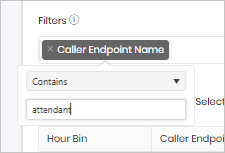
The template also includes a filter on Caller Endpoint Name containing the text “Auto Attendant”. If your Auto Attendants use a different naming convention, such as “AA”, select the filter and update the text accordingly to ensure the correct Auto Attendants are included in the results.