Telephony widgets – Individual High Cost Calls
Definition
The Individual High Cost Calls widget displays any individual calls where the total call cost exceeds the value specified in the filter. In this example, the threshold has been set to £5.00, meaning only calls with a total cost greater than £5.00 will be returned.
This widget can be used to identify unusually expensive calls and investigate the destination, duration, and associated costs of each call. Where available, the user’s email address is also displayed, enabling administrators to quickly contact the individual and investigate the reason for the high cost.
Output list
- Leg Start
- Calling Tree Path
- Calling Party Email
- Calling Digits
- Calling Label
- Called Digits
- Called Label
- Call Category
- Talk Time
- Base Cost Net – Sorted highest to lowest
- Call Outcome
Sample output
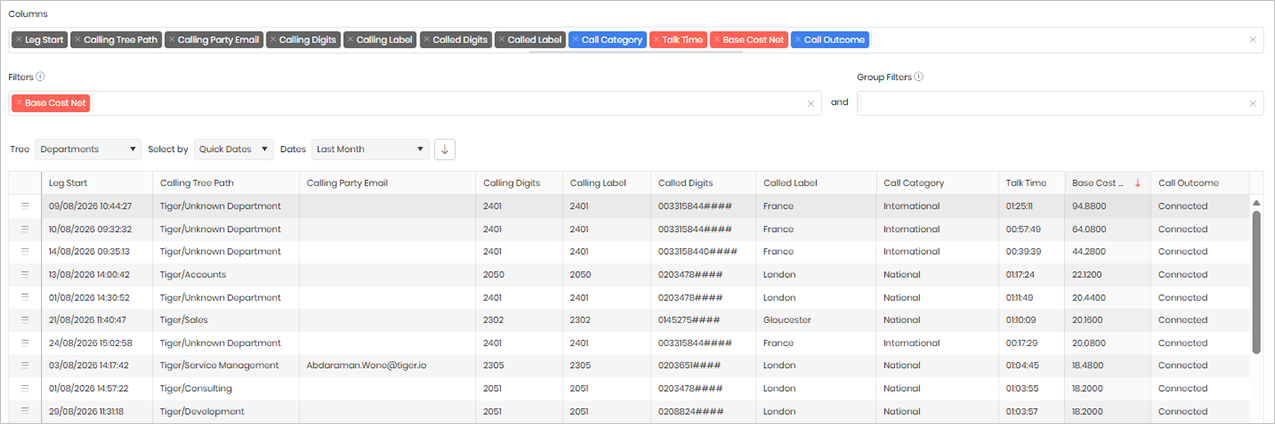
Widget text
{"ViewGuid":"86c3d71b-0b81-45ad-8eef-2ce931e9e32e","Definition":{"ColumnAggregates":[{"Alias":"LegStart_8f59a1485f0d4ff1","Label":"Leg Start","ColumnId":"LegStart","AggregateType":"Value","IsAggregate":false,"IsExpanded":false,"Type":-2},{"ColumnId":"CallingTreePath","IsNew":true,"Type":-2,"Alias":"CallingTreePath_a5c0e00f7f4b352b","Label":"Calling Tree Path"},{"ColumnId":"CallingPartyEmail","IsNew":true,"Type":-2,"Alias":"CallingPartyEmail_2662d7d46511e37f","Label":"Calling Party Email"},{"Alias":"CallingDigits_b83a4c23889c9fe5","Label":"Calling Digits","ColumnId":"CallingDigits","AggregateType":"Value","IsAggregate":false,"IsExpanded":false,"Type":-2},{"Alias":"CallingLabel_1148cfcc968c4404","Label":"Calling Label","ColumnId":"CallingLabel","AggregateType":"Value","IsAggregate":false,"IsExpanded":false,"Type":-2},{"Alias":"CalledDigits_3e915dba8572313a","Label":"Called Digits","ColumnId":"CalledDigits","AggregateType":"Value","IsAggregate":false,"IsExpanded":false,"Type":-2},{"Alias":"CalledLabel_042a6624ef52cc19","Label":"Called Label","ColumnId":"CalledLabel","AggregateType":"Value","IsAggregate":false,"IsExpanded":false,"Type":-2},{"Alias":"CallCategoryName_23f57d49e31a627e","Label":"Call Category","ColumnId":"CallCategoryName","AggregateType":"Value","IsAggregate":false,"IsExpanded":false,"Type":-3},{"Alias":"TalkTime_e4f3225fb42118de","Label":"Talk Time","ColumnId":"TalkTime","AggregateType":"Value","IsAggregate":false,"IsExpanded":false,"Type":-1},{"Alias":"BaseCostNet_216928685abecd06","Label":"Base Cost Net","ColumnId":"BaseCostNet","AggregateType":"Value","IsAggregate":false,"IsExpanded":false,"Type":-1},{"ColumnId":"CallOutcomeName","IsNew":true,"Type":-3,"IsExpanded":false,"Alias":"CallOutcomeName_89df1ee9ee79bdf4","Label":"Call Outcome"}],"PreFilters":[{"IsAggregate":false,"ColumnId":"BaseCostNet","FilterColumnAlias":null,"Alias":"BaseCostNet_af8a0866caf64e67","Label":"Base Cost Net","AggregateType":"Value","Operator":"IsGreaterThan","Value":5,"Value2":null,"Type":7}],"PreGroupFilters":[],"Parameters":{"SelectedTreeId":"1","DateSelectionMethod":"UseQuickDates","QuickDate":{"Type":"8","FromLocal":"01/08/2026 00:00:00","ToLocal":"31/08/2026 23:59:59"}},"GridSettings":"{\"columns\":[{\"index\":0,\"field\":\"Id\",\"width\":45.0078,\"hidden\":false},{\"index\":1,\"field\":\"LegStart_8f59a1485f0d4ff1\",\"width\":155.008,\"hidden\":false},{\"index\":2,\"field\":\"CallingTreePath_a5c0e00f7f4b352b\",\"width\":206.004,\"hidden\":false},{\"index\":3,\"field\":\"CallingPartyEmail_2662d7d46511e37f\",\"width\":177.996,\"hidden\":false},{\"index\":4,\"field\":\"CallingDigits_b83a4c23889c9fe5\",\"width\":122,\"hidden\":false},{\"index\":5,\"field\":\"CallingLabel_1148cfcc968c4404\",\"width\":123.992,\"hidden\":false},{\"index\":6,\"field\":\"CalledDigits_3e915dba8572313a\",\"width\":147.99599999999998,\"hidden\":false},{\"index\":7,\"field\":\"CalledLabel_042a6624ef52cc19\",\"width\":168.992,\"hidden\":false},{\"index\":8,\"field\":\"CallCategoryName_23f57d49e31a627e\",\"width\":172,\"hidden\":false},{\"index\":9,\"field\":\"TalkTime_e4f3225fb42118de\",\"width\":92.9961,\"hidden\":false},{\"index\":10,\"field\":\"BaseCostNet_216928685abecd06\",\"width\":121.004,\"hidden\":false},{\"index\":11,\"field\":\"CallOutcomeName_89df1ee9ee79bdf4\",\"width\":209.285,\"hidden\":false}],\"sortField\":\"BaseCostNet_216928685abecd06\",\"sortDir\":\"desc\",\"pageSize\":50}"},"DefinitionVersion":1}
Modifications
Once you have imported the widget template, you can customise it to better suit your reporting requirements. Any of the filters can be modified, removed, or expanded, and additional columns can be added to provide more detailed information.
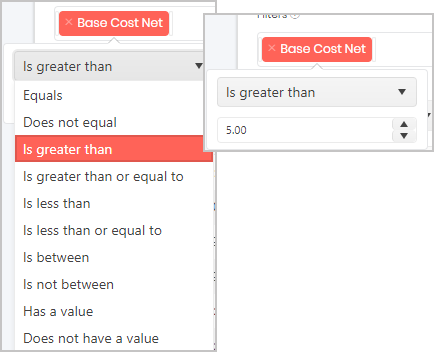
To change the Base Cost Net threshold, locate the Base Cost Net filter in the Filters area and select it. You can then either choose a different comparison option from the drop-down list or enter a new value to define the cost threshold. The widget will update to return calls that match the criteria you specify.