Telephony widgets – CDR Source Leg Count
Definition
The CDR Source Leg Count widget summarises the total number of call legs recorded against each CDR source within your system for the selected reporting period. The results can also be broken down by Call Direction, allowing you to distinguish between inbound, outbound, and internal call activity. This provides visibility into the volume of call traffic processed by each CDR source and how that traffic is distributed across Tiger Prism.
Output list
- Date
- Collecting CDR Source
- Incoming
- Outgoing
- Internal
- Tandem
Sample output
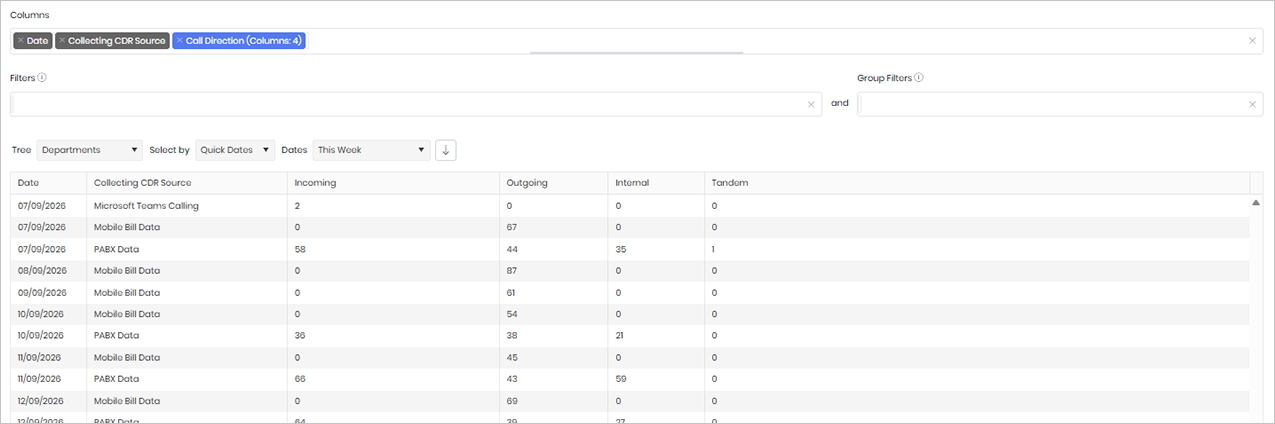
Widget text
{"ViewGuid":"86c3d71b-0b81-45ad-8eef-2ce931e9e32e","Definition":{"ColumnAggregates":[{"ColumnId":"Date","IsNew":true,"Type":-2,"Alias":"Date_8ea69daf7a4bc88d","Label":"Date"},{"ColumnId":"CollectingCdrSourceName","IsNew":true,"Type":-2,"Alias":"CollectingCdrSourceName_74eea199bfc98a6d","Label":"Collecting CDR Source"},{"ColumnId":"CallDirectionName","IsNew":true,"Type":-3,"IsExpanded":true,"Alias":"CallDirectionName_916b217e6daa2377","Label":"Call Direction (Columns: 4)"}],"PreFilters":[],"PreGroupFilters":[],"Parameters":{"SelectedTreeId":"1","DateSelectionMethod":"UseQuickDates","QuickDate":{"Type":"4","FromLocal":"07/09/2026 00:00:00","ToLocal":"13/09/2026 23:59:59"}},"GridSettings":"{\"columns\":[{\"index\":0,\"field\":\"Date_8ea69daf7a4bc88d\",\"width\":106.0625,\"hidden\":false},{\"index\":1,\"field\":\"CollectingCdrSourceName_74eea199bfc98a6d\",\"width\":282.293,\"hidden\":false},{\"index\":2,\"field\":\"CallDirectionName_916b217e6daa2377_1\",\"width\":298.602,\"hidden\":false},{\"index\":3,\"field\":\"CallDirectionName_916b217e6daa2377_2\",\"width\":153.367,\"hidden\":false},{\"index\":4,\"field\":\"CallDirectionName_916b217e6daa2377_3\",\"width\":135.418,\"hidden\":false},{\"index\":5,\"field\":\"CallDirectionName_916b217e6daa2377_4\",\"width\":1899.58,\"hidden\":false}],\"sortField\":null,\"sortDir\":null,\"pageSize\":50}"},"DefinitionVersion":1}
Modifications
If you do not need to analyse the data by date, you can remove the Date column from the selected columns list. This will aggregate the results across the entire reporting period, providing a summary view without a daily breakdown.